Platform
One platform. Five jobs.
Run, Work together, Organize and remember, Trust, and Security. What each one covers today, shown on the app's own screens.
01Run
The agent CLIs your teams already use, unchanged.
Each agent is the vendor's own CLI in its own terminal, on this computer or on a Linux server you link. It uses your subscription or API key, starts from a template or by hand, and offers to resume its exact conversation after a stop, a restart or a crash.
- Claude Code, Codex, OpenCode, Pi, Omp, Grok, Muse Code, Antigravity
- This PC, or a Linux server over SSH or a tunnel
- Claude Code through Bedrock, Vertex, Foundry or a compatible gateway
- Launch settings saved as templates
- macOS and Linux desktop appsPlanned
02Work together
Questions reach a person. Assistants keep the thread.
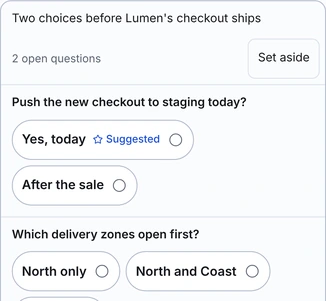
An agent that needs a decision asks, and its question waits in the Inbox, at the desk or on the phone, until someone answers. Assistants talk, remember and coordinate the agent CLIs, alone or in a squad with a lead, and what they propose waits for your OK. Agents message each other, and you can read every message.
- An Inbox for questions and approvals, at the desk and on the phone
- Assistants, and squads with a lead
- Messages between agents, in any workspace, readable by you
- Reminders and an agenda
- Answers from a private Telegram chat
- WhatsApp, Slack and Discord channelsPlanned
03Organize and remember
Work stays findable.
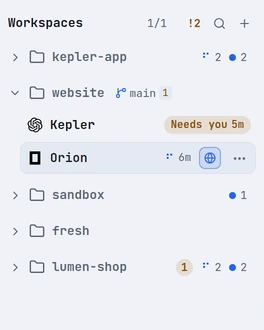
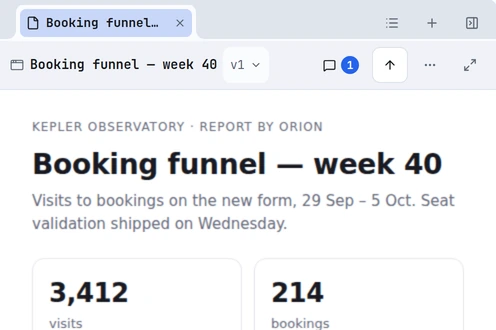
A workspace holds one project's agents, files and history. Recall searches the past sessions of every CLI, and what an agent publishes is kept as an artifact, with every version. Automations start work on a schedule, from a webhook or with one click, with limits per run.
- Workspaces: each project's agents, files and history
- Templates and blueprints
- Recall across the sessions of every CLI
- Artifacts, with every version kept
- Dashboards over your read-only data
- Automations, with limits per run
04Trust
See what happened. Decide what lands.
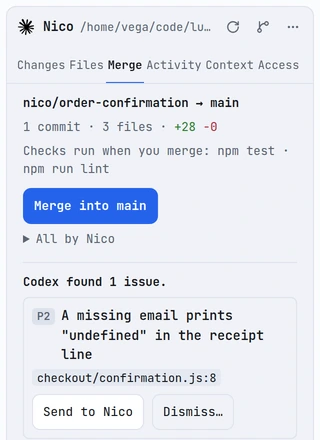
Before a change merges, a second agent CLI reads it in a read-only checkout, and its findings come to you. By default a person presses merge. Analytics shows spend, activity and limits from a record kept on your computer: numbers, never the content of a prompt.
- Approvals and review gates
- A second CLI reviews before merge
- Analytics: Spend, Activity, Agents, Quality, Limits, Coverage
- Who paid: plan or API
- Signed webhooks to your systems
- Audit-log exportPlanned
05Security
Every permission is a choice someone can see.
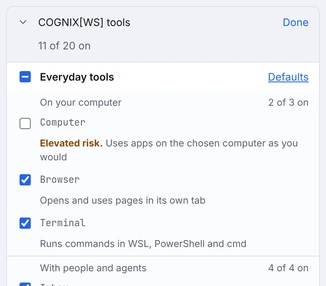
You tick the tools an agent gets when you create it, and you can take one back while it runs. Keys and website sign-ins live in encrypted vaults; a sign-in is filled in the page and never shown to the agent. Work that needs a screen can run in a Sandbox or a VM, away from your own.
- Tools granted when an agent is created
- Whether a CLI asks before it acts, and whether a folder is trustedYour setting
- Encrypted vaults for keys and sign-ins
- Sandbox and VM
- Backups with weekly recovery rehearsals
Underneath
Extensions you review, and a base IT can manage.
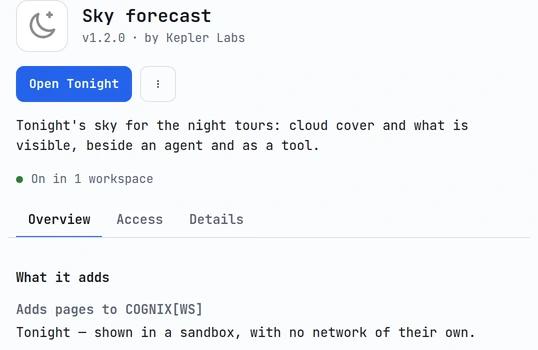
Extensions add panels, pages and tools, and you see what one adds and what it may do before it installs. MCP servers are set up once for every CLI and reach an agent only where you tick them. Updates arrive signed, and a person confirms each install.
- Extensions: panels, pages and tools, reviewed before install
- MCP servers for every CLI, in one place
- Signed updates, confirmed by a person
- Devices: pairing, a list, Forget
Start on one computer, or talk to us.
Create your free account to run agents today. Pro is for one person who works with agents every day. For Enterprise, per named user, talk to us with your engineering and security leads.