Security and governance
Controls you can check.
COGNIX[WS] runs on your machines. This page says what stays there, what leaves and to whom, what your people control, and where the platform stops. Each control names the place where you can check it.
01 · The boundary
What runs inside, and every connection that leaves.
The vendors' real CLIs, running as your OS user.
One program on each computer. It opens the app's own connections.
- Workspaces and agents
- Inbox and approvals
- Messages between agents
- Review and merge
- Devices and pairing
- Extensions and connectors
Their memory and files, on this computer.
A folder you choose.
Keys and sign-ins, encrypted, masked on screen.
Where they already are.
Numbers, never content.
What an agent CLI reads from your files and sends to its model travels on that CLI's own connection, in the first row.
By default the app connects to three kinds of destination. Your model providers: the agent CLIs and the Assistants talk to them directly, and the app asks them for your plan's limits. cognix.ws: the account, and updates. Public catalogues: lists of prices, extensions and connectors. An agent's own tools reach what your network allows. Everything else happens only when you act or switch it on. Choose a connection to read what it carries.
02 · What stays
What stays on your machines.
The platform keeps its own data in one folder on your computer and leaves the agents' work in the files and tools you already own.
| What | Where it lives | Worth knowing |
|---|---|---|
| Code and project files | In your own folders, untouched | Not part of a backup: your repositories stay your source of truth. |
| Agent conversations | Each CLI's own session files | If COGNIX[WS] is not running, they are still that CLI's regular data. |
| Workspaces, Inbox, messages, settings | One database in the platform's folder | Readable by the OS user who runs the app. |
| Provider keys | A vault encrypted with AES-256-GCM | Shown only as a masked hint. The key file sits beside the vault: see Limits. |
| Website sign-ins | A sealed login vault, in two sets | "Your logins" opens with your own password and is never used by agents. |
| Assistants' keys, memory and files | A vault and a folder per Assistant | Private to that Assistant unless you mark a key as shared. |
| Activity and spend | A local ledger, read from each CLI's own files | State, waits, who started a turn, tool outcomes, cost. Never content. |
| Artifacts | The platform's folder, every version kept | Pages run sandboxed, with no network of their own. |
03 · What leaves
What leaves, to whom, and your switch.
By default the app connects to your model providers, to cognix.ws and to public catalogues: the rows tagged Always. What an agent's own tools reach while it works is a row of its own, and it is yours to contain. Everything else happens only when you act or switch it on. (cognix.ws is the product's own site and account service; cognixws.com is this site.)
| Connection | To whom | What it carries | When | Your switch |
|---|---|---|---|---|
| Agent CLI and its modelAlways | Your model provider | Whatever that CLI sends: prompts, code context, tool results | While an agent works | You choose the CLI, the provider and the key. Claude Code can go through Bedrock, Vertex, Foundry or your own gateway |
| Assistant and its modelAlways | The provider you connected, or a local model | Its instructions, the conversation, tool results | On each turn | Chosen per Assistant |
| Provider limitsAlways | Each provider you are signed in to | A request for your plan's usage windows, made with that sign-in | Every five minutes | Tied to that sign-in: remove the account and it ends |
| An agent's own toolsAs an agent works | Git remotes, package registries, the web, the MCP servers you ticked | Whatever its task makes the CLI run: a push, an install, a fetch | While an agent works | That CLI's permissions and your network, not the platform. Contain it with a Sandbox, a separate OS account or your own proxy |
| Account authorizationAlways | cognix.ws | Account, plan, device name, app version, system | At sign-in, then every five minutes | Required. Offline, work continues up to 24 hours |
| Update checkAlways | cognix.ws | Version, build, update phase | About every six hours | A person confirms each install |
| Public cataloguesAlways | GitHub (public files), the MCP Registry | Requests for public lists: model prices, extensions, connectors | In the background, while the app runs | The price table can be turned off or pointed at your own copy. The full list of hosts is not published yet: see Evidence |
| CLI and tool installsOn your action | npm, GitHub releases, vendor channels | A package download | When you install or update a CLI in the app | Your action |
| FeedbackOn your action | cognix.ws | The text you type, the version, the kind of screen | When you send it | Your action |
| Local model downloadOn your action | Hugging Face | A model file | When you download a model | Your action |
| Crash reportsOpt-in | cognix.ws | Failure kind, version, system, screen, up to 12 stack frames | After a failure | Off by default |
| Push to your phoneOpt-in | Your phone browser's push service | Encrypted: who needs you, the kind of request | When something waits for you | Off until you allow it, per device |
| TunnelsOpt-in | Cloudflare or Tailscale | Your session with your own computer | While the tunnel is on | Off by default; an extension you add |
| Backup copiesOpt-in | The storage you choose | An encrypted repository | On your schedule | Off by default |
- No usage analytics are sent.
- Prompts, conversations, code, files and keys are never sent to cognix.ws.
What goes to us goes to one origin, https://cognix.ws, and it works through an outbound proxy. A proxy that inspects TLS must exempt that origin: the app refuses a re-signed certificate. The other rows tagged Always go to your providers and to public catalogues. The agent CLIs keep the routes they use today, to their model providers and to whatever their tools reach; the rest of this table is reached only when you act or switch something on.
A data processing agreement (DPA) is available on request: privacy@cognix.ws.
04 · The controls
The controls, one line each.
What it does, where you check it, and whether it is there today, a setting you choose, or planned. Two things are kept apart: what an agent was given (its tools, keys and data), and whether its CLI asks before each action.
| ID | Control | What it does | Check it in | Status |
|---|---|---|---|---|
| A · What each agent may use | ||||
| A-01 | Tools granted at creation | You tick the tool families an agent gets when you create it. Computer, Email, Channels and Blueprints start unticked. | New agent › Tools | Available |
| A-02 | Take a tool back while it runs | Untick a tool and the agent loses it at its next call. | Launch settings | Available |
| A-03 | A helper never gets more than its creator | A helper (an agent started by another agent) gets at most its creator's tools and connectors, and cannot start helpers of its own. An agent a person started can have at most eight helpers running at a time. | Launch settings (the helper's) | Available |
| A-04 | Extra tools need your approval | When an agent asks for a tool family beyond the default, one approval card is filed in your Inbox. With no answer in 15 minutes, nothing is created. | Inbox › Remembered approvals | Available |
| A-05 | Read the launch before it runs | "Next start" sums up the model, approvals, tools and computer. "What runs" shows the whole command and everything COGNIX[WS] adds to it. | Launch settings › What runs | Available |
| A-06 | Whether a CLI asks before it acts | By default each CLI approves its own actions, so work does not stall. Turn asking on, per CLI or per agent, and its prompts wait for you. | Launch settings › Approvals | Your setting |
| A-07 | Whether a folder is trusted | By default the CLI's "trust this folder?" question is skipped. Turn the skip off for folders you do not know. | Launch settings | Your setting |
| A-08 | A switch that stops agents starting agents | One machine-wide switch pauses every way an agent can start another, including from its own shell. | Messages › Agents start agents | Available |
| A-09 | Tools per Assistant | One switch per tool family. What you turn on, it uses without asking each time; what you turn off, it cannot use. Computer is marked elevated risk. | Assistant › Tools | Available |
| B · People decide | ||||
| B-01 | Questions wait in the Inbox | An agent's question waits, for hours if needed, with up to six suggested answers. Answer at your desk or on your phone. | Inbox | Available |
| B-02 | Every answer records where it came from | Your own screens, a chat channel or an Assistant: the origin is stored with the answer. | Inbox › Done | Available |
| B-03 | Proposals do not run until approved | A reminder, an automation or a template that an agent or an Assistant proposes waits for your answer: approve, adjust or discard. | Inbox | Available |
| B-04 | Email is proposed, never sent by an agent | Email is off for agents by default. With access, an agent can only propose a send, and you review the exact message. | Inbox | Available |
| B-05 | Some answers only at your own screen | Sign-ins, sends, spending and remembered approvals cannot be answered through a chat channel or by a script. | Inbox | Available |
| B-06 | Only a person changes who has access | No agent tool can change the access rule, make a pairing code, create a token or restore a backup. | Server › Access · Devices | Available |
| C · Review before merge | ||||
| C-01 | A person merges, by default | "Who merges" stays on "You" until you choose otherwise (C-04): a change waits for a person's click. An agent has no tool that merges; it can only ask. | Merge | Available |
| C-02 | A second CLI reviews | Another CLI reviews the change in a read-only checkout, never the author's own CLI. Findings are recorded, and only you dismiss one, with a reason. | Merge › Review | Available |
| C-03 | A review lock | Nothing merges without a finished review of exactly this revision and no open P0 or P1 finding. | Workspace › Integration | Your setting |
| C-04 | Rules for changes that wait for you | If you choose to let changes merge when their checks pass, the platform runs the merge an agent asked for, in a fresh tree, and fixed rules still hold a change for you: files, dependencies, paths, size. What cannot be evaluated is held. | Workspace › Integration | Your setting |
| D · Credentials | ||||
| D-01 | Provider keys in an encrypted vault | Keys are stored with AES-256-GCM and shown only as a masked hint. | Agent CLIs › Providers | Available |
| D-02 | Website sign-ins are filled, never shown | An agent asks to sign in. The platform fills the login in the page, over HTTPS, on the site it is bound to. The agent never sees it. | Logins | Available |
| D-03 | A locked set for your own logins | "Your logins" opens with a password of at least 12 characters, locks after a restart and is never used by agents. | Logins › Your logins | Available |
| D-04 | A vault per Assistant | Each Assistant keeps its own keys, private unless you mark one as shared. | Assistant › Setup | Available |
| D-05 | Stored secrets are masked in logs | A stored value appears as [REDACTED] in the platform's logs and stored text. | Console | Available |
| E · Devices and identity | ||||
| E-01 | HTTPS always, from an authority of your own | Each computer issues its own certificates. That authority is limited to local and private names and cannot vouch for a public site. | The certificate in your browser | Available |
| E-02 | A device is paired, not assumed | A pairing code lasts ten minutes, works once and locks after five failures. | Devices | Available |
| E-03 | Forget a device and it is gone | "Devices" lists every session. "Forget" ends one and closes its open connections. | Devices | Available |
| E-04 | Tokens for scripts come from a person | A script gets its token only from a person. It cannot make another, change access or forget other devices. | Devices › Connect an app or script | Available |
| E-05 | Account sign-in | Google, GitHub, Microsoft or a passkey. | Account | Available |
| E-06 | Company seats | A company administrator assigns named people within the seats you bought. | Account › Company | Available |
| E-07 | SAML SSO, SCIM, roles | Single sign-on through your identity provider, provisioning and roles inside the app. | With Enterprise team management | Planned |
| F · Isolation | ||||
| F-01 | A computer of its own for the agent | An agent that needs a screen can work in a Windows Sandbox, the agents' VM or a Linux Sandbox. Nothing it does reaches your screen, keyboard or mouse. | Launch settings › Computer | Available |
| F-02 | The Linux Sandbox's network | A sealed internal network. Traffic leaves through a proxy, on ports 80 and 443 only. | Computer › Linux Sandbox | Available |
| F-03 | Take over, then hand back | Take control to pay, sign in or type a code, then hand it back with a note. | Agent screen | Available |
| F-04 | Every step with the Computer tool is listed | Allowed or refused, by agent and by computer, kept ninety days. | Computer › Activity | Available |
| F-05 | Extension and artifact pages run sandboxed | A page has no network of its own and reaches its own process only through the platform. | Extensions › Review | Available |
| F-06 | Where an Assistant's traffic leaves | Per Assistant: this machine's network, one of your linked computers, or your proxy. | Assistant › Tools › Network exit | Available |
| G · Data and extensions | ||||
| G-01 | Databases are read-only for agents | PostgreSQL, MySQL, ClickHouse, SQLite or CSV. Read-only is enforced by the connection itself, with limits per query and per hour. | Integrations › Data sources | Available |
| G-02 | Every query is logged | Who asked, the statement, the rows and the time. | Data source › Queries | Available |
| G-03 | Review an extension before it installs | You see what it adds and what it may do. The files are checked against the digest you reviewed. | Extensions › Review | Available |
| G-04 | MCP servers only where you tick them | A server reaches an agent only where you tick it, and a helper is capped at its creator's servers. | Connectors | Available |
| G-05 | CLI installs from the vendor's own channel | A CLI is installed with its vendor's package manager or official installer and proven in a staging folder first. A failed download leaves the working CLI untouched. | Agent CLIs | Available |
| H · Record and recovery | ||||
| H-01 | Activity and spend, on your computer | State, waits, who started each turn, tool outcomes and cost. Never the content. | Analytics | Available |
| H-02 | Every message between agents is readable | Agents and Assistants message each other, and you can read every message. | Messages | Available |
| H-03 | Events | Kept seven days. Computer and browser-automation steps are kept ninety. | Console | Available |
| H-04 | Send events to your own systems | Webhooks signed with HMAC-SHA256 and a timestamp, and a read-only summary token. | Webhooks | Available |
| H-05 | Audit-log export for a SIEM | A full export in a standard format. | With Enterprise team management | Planned |
| H-06 | Backups you can restore | Scheduled snapshots, each verified. Encrypted copies to your own storage. Weekly recovery rehearsals. Only a person restores. | Backups › Test recovery | Available |
| H-07 | Sessions resume | After a stop, a restart or a crash, each agent offers to resume its exact conversation. | The agent's card | Available |
| H-08 | Signed updates | A new build arrives as a signed manifest. Signature, expiry, size and SHA-256 are checked before anything runs, and a person confirms the install. | The update prompt | Available |
Check it in the app.
The catalog names a place for every control. Six of those places, as they look today.
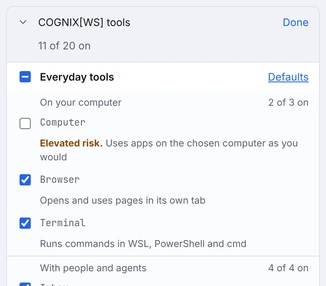
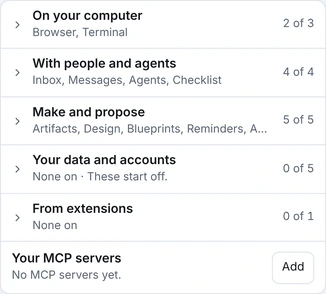
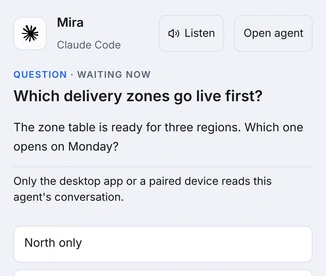
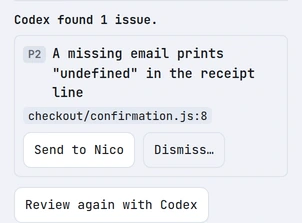
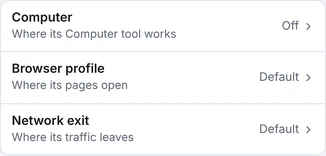
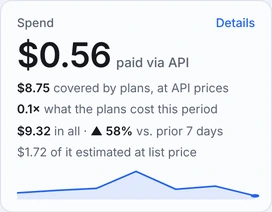
Details of real captures, at their own scale · example data
05 · What a company can set
What a company can set today, and what each person sets.
The controls above are real, and most of them are set on each person's own installation. This is where the line runs today, and how to run a pilot inside it.
A company administrator
- Who has a seat, by name
- Adding and removing people within the seats bought
- The plan and its renewal
Each person, on their installation
- Which tools each agent and each Assistant gets
- Whether a CLI asks before it acts, and whether a folder is trusted
- Which devices are paired
- Which servers, extensions and data sources are added
- Where backups go
Company-wide
- SAML SSO and SCIM: planned
- Roles: planned
- Central policy for what each person sets today: planned
- Audit-log export: planned
- Settings pushed by MDM or group policy: not offered
A pilot under your rules.
Six settings that exist today. Each names the control it uses.
- 01Give the agents their own ground
A separate OS account or a server you add, and a Sandbox or the VM for anything that needs a screen.
F-01 - 02Make the CLIs ask
Turn asking on and the folder-trust skip off, per CLI or per agent.
A-06A-07 - 03Grant only what the task needs
Tick the tool families one by one. Leave Computer, Email and Channels off.
A-01A-09 - 04Keep a person on every merge
Leave "Who merges" on "You" and turn the review lock on.
C-01C-03 - 05Send the record to your own systems
Signed webhooks for agent, Inbox and automation events.
H-04 - 06Back up to storage you control
Encrypted copies under your own recovery password, and a recovery rehearsal each week.
H-06
06 · What an agent cannot do
What an agent cannot do.
Some doors answer only a person: this computer's browser, the desktop app or a paired phone. An agent's token is refused before the request is even read.
- Change who must pair to reach the appThe access rule has no agent side.
- Make a pairing code or a tokenA way in is made by a person, or not at all.
- Start an agent outside its caps, or re-grant oneA helper gets at most what its creator has.
- Approve a change that is heldThe store refuses any actor but the person.
- Restore or remove a backup, or turn backups offOnly you restore.
- Answer a sign-in, a send or a spending approvalThose cards are yours.
- Read a website loginIt is filled in the page for it.
- Silence a resource warningIt can read one. It cannot dismiss it.
These are product rules, enforced by the platform's own API and covered by tests. They are not a wall against a program running as your own OS user: see Limits, L-03.
07 · Who is responsible for what
Who is responsible for what.
A local-first product moves the line. Most of what a cloud vendor would hold stays with you.
Your company
- Who gets an account and a seat
- Which tools each agent gets
- Whether CLIs ask before they act
- The OS account, disk encryption and network the app runs on
- Your contracts with model providers
- Where backups go, and the recovery password
The platform
- Its own gates: grants, approvals, review, pairing
- Encrypted vaults and masked secrets
- Signed updates, checked before install
- A local record of activity and spend
- Verified backups and tested restore
- Telling you every connection the app makes
Your model providers
- What they do with what a CLI sends them
- Retention and training, under your contract
- Their own access controls and certifications
- Rate limits and plan windows
08 · Limits we state
Limits we state.
Where the platform stops. Better read here than found in a review.
- L-01The app runs as you.
It executes with the permissions of the OS user who runs it. It is an operating layer around the agent CLIs, not a sandbox for them. For work you want isolated, use a separate OS account, a Sandbox or the VM.
- L-02Tool grants gate the platform's tools, not the CLI's own.
What a CLI may do in your files and shell is that CLI's permission setting. By default COGNIX[WS] starts each CLI approving its own actions. You can turn that off, per CLI or per agent.
- L-03A program running as your user is inside the boundary.
The vault's key file sits beside the vault, and a local process can reach parts of the local API. The checks organize agents' work. They are not a wall against software you run yourself.
- L-04An account is required.
The app signs in to cognix.ws and renews its authorization. Without a connection, work continues for up to 24 hours. There is no air-gapped mode today.
- L-05No certifications yet.
No SOC 2 report, no ISO/IEC 27001 certificate and no external penetration test to cite today. When one exists it will be linked here with its date and scope.
- L-06The record is local and not tamper-evident.
Events are kept seven days, Computer steps ninety, and a person with access to the machine can alter local files. Send events to your own systems with signed webhooks if you must keep them.
- L-07The first backup copy is not encrypted.
It is a folder on the same computer and may hold CLI logins as each CLI keeps them. Copies to other destinations are encrypted.
- L-08It is a beta, for Windows.
Windows 11 with WSL 2 today; servers are Linux. Interfaces can still change between releases.
- L-09One person per installation.
Each installation is one person's work session. Company accounts assign named people to seats. Roles, SSO and central policy are planned.
- L-10Extensions run as you.
You review an extension before it installs. After that it runs as your user, and its updates do not ask again.
- L-11Only the vaults are encrypted by the app.
Its database and each CLI's session files are ordinary files of your OS user. Use disk encryption on every machine.
09 · Evidence and documents
Evidence and documents.
What a review usually asks for, and where each stands today.
| Document | Today | What it will hold |
|---|---|---|
| SOC 2 report | Not yet | The report, its period and how to request it. |
| ISO/IEC 27001 certificate | Not yet | The certificate and its scope. |
| Independent penetration test | Not yet | Firm, date, scope and a summary letter. |
| Data processing agreement (DPA) | On request | Write to privacy@cognix.ws. No text is published here. |
| Vulnerability reports and security contact | Available | security@cognix.ws. How to report is on the Trust center. No response time is promised yet. |
| Code signing | Available | The Windows installer is signed by COGNIXSE TECNOLOGIA LTDA. The download page gives each build's SHA-256. |
10 · Questions a security team asks
Questions a security team asks.
Do our code or our prompts pass through COGNIX[WS]'s servers?
No. The agent CLIs run on your machines and connect to their own model providers with your subscription or key. The app talks to cognix.ws for sign-in, the plan check and updates, and for nothing else unless you act or switch it on.
Can it run with no internet connection?
Not today. The app needs cognix.ws to sign in and to renew its authorization; without a connection, work continues for up to 24 hours. Assistants and two of the CLIs can use a local model, but the account still needs the connection.
Do you train models on our data?
COGNIX[WS] has no models and receives no prompts or code. What a model provider does with what a CLI sends it is set by your contract with that provider.
We already use Claude Code and Codex. What does this add?
The same CLIs, in their own terminals, plus one place to see them all, questions that wait for a person, review before merge, a vault for keys, a record of activity and spend, and backups.
Does an agent ask before every action?
Only if you say so. By default each CLI approves its own actions so work does not stall. Turn asking on, per CLI or per agent, and its prompts wait for you. Either way, the platform's own tools are limited to the ones you granted.
Do you support SSO and SCIM?
Sign-in today is Google, GitHub, Microsoft or a passkey, and a company administrator assigns named people to seats. SAML SSO, SCIM and roles are planned with Enterprise team management.
Which certifications do you hold?
None yet: no SOC 2 report, no ISO/IEC 27001 certificate and no external penetration test to cite. What exists instead is on this page: what stays and what leaves, the controls with their status, and the limits we state.
Do you sign a data processing agreement?
A DPA is available on request: write to privacy@cognix.ws. Its text is not published here.
What happens if cognix.ws is unreachable, or if you stop?
Work continues until the 24-hour authorization ends. After that new work is held, running agents are not stopped, and reading and export stay. Your agents' conversations and settings remain each CLI's own files, usable without COGNIX[WS].
Can we allow-list what it calls?
In part, today. What goes to us is one origin, https://cognix.ws, for the account and for updates, and it works through an outbound proxy. If your proxy inspects TLS, exempt that origin: a re-signed certificate is refused. The app also asks your providers for plan limits and reads public catalogues on GitHub and the MCP Registry, and the agent CLIs call the model providers you chose. A tested list of every host is not published yet: it is listed under Evidence.
How do we report a vulnerability?
Write to security@cognix.ws. Say which version and system, what you did, what happened and what you expected, and send what lets us reproduce it. We acknowledge every report. There is no bounty programme, and no response time is promised yet. The same is on the Trust center.
Review it with your own security team.
We walk through the boundary, the controls and the limits on a real installation, and leave you the list.